Hi,
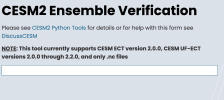
I am currently porting CESM2.1.5 to my HPC cluster and attempting to perform the Ensemble Verification tests. Following the official example steps at Python Tools | Community Earth System Model, I created test runs for the UF-CAM-ECT configuration and successfully generated the three required historical files. However, when I upload these files to the online verification tool (CESM2 Ensemble Verification), the result box remains completely blank after uploading (as shown in the attached picture). I have tried this multiple times with the same outcome.
I found a similar issue mentioned in a previous forum thread titled "Several errors when running scripts_regression_test.py" (posted March 13, 2024). In that case, it appeared that a staff member resolved it from the backend, but that solution does not apply to my current situation.
Could anyone please advise on what might be causing this blank result and how I can proceed with the verification? Thank you for your help!
I am currently porting CESM2.1.5 to my HPC cluster and attempting to perform the Ensemble Verification tests. Following the official example steps at Python Tools | Community Earth System Model, I created test runs for the UF-CAM-ECT configuration and successfully generated the three required historical files. However, when I upload these files to the online verification tool (CESM2 Ensemble Verification), the result box remains completely blank after uploading (as shown in the attached picture). I have tried this multiple times with the same outcome.
I found a similar issue mentioned in a previous forum thread titled "Several errors when running scripts_regression_test.py" (posted March 13, 2024). In that case, it appeared that a staff member resolved it from the backend, but that solution does not apply to my current situation.
Could anyone please advise on what might be causing this blank result and how I can proceed with the verification? Thank you for your help!