
Dear all,
I am using CESM1.2.2 with CAM4, and I would like to output one history file per month, where each file contains all 6-hourly samples within that month (so that the number of samples automatically adjusts depending on whether the month has 28, 29, 30, or 31 days).
However, it seems that relying on mfilt alone cannot achieve this kind of month-by-month automatic adjustment.
For example, when I set
in user_nl_cam, the output looks like this:
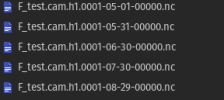
Does anyone have any suggestions?
I am using CESM1.2.2 with CAM4, and I would like to output one history file per month, where each file contains all 6-hourly samples within that month (so that the number of samples automatically adjusts depending on whether the month has 28, 29, 30, or 31 days).
However, it seems that relying on mfilt alone cannot achieve this kind of month-by-month automatic adjustment.
For example, when I set
nhtfrq = 0,-6mfilt = 1,120in user_nl_cam, the output looks like this:
Does anyone have any suggestions?

