
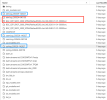
Hello,@oleson . I ran the spin up for long days with "./xmlchange NTASKS=46", and when I thought it's almost done, my school server has some problems lead to the stopped of my docker. And I was stupid to run the "./case.submit" when I restart docker. I found the first file of "BGC_QTP.....2000-01-01-0000.nc" had been overwritten,so I stopped the program immediately and downloaded the file of 2020 and 2040. The records are still in the original log file as follows blue box in the picture.
One idea I have now is to start over with the same spin up, download it after finishing the first file, and replace the first file in that directory. And then start again from the original log file.
I don't know if it works, and I don't know how to restart the spin up process. And opening "continue run inside env run does not work. No rpointer file is reported.
One idea I have now is to start over with the same spin up, download it after finishing the first file, and replace the first file in that directory. And then start again from the original log file.
I don't know if it works, and I don't know how to restart the spin up process. And opening "continue run inside env run does not work. No rpointer file is reported.

