What version of the code are you using?
We use the CLM51 (Compset: 2000_DATM%1PT_CLM51%BGC_SICE_SOCN_SROF_SGLC_SWAV_SESP)
Have you made any changes to files in the source tree?
We use high-resolution atmospheric forcing (2 km) to drive a high-resolution regional CLM simulation (2 km). For this simulation, we initially used the 0.05-degree land-surface dataset downloaded from the NCAR website. Later on, we replaced land-surface data with another set of high-resolution land-surface datasets (2km).
Describe every step you took leading up to the problem:
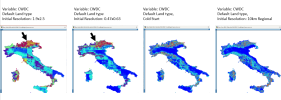
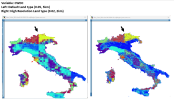
The model outputs related to carbon (such as CWDC) show a distinct “line” between certain regions (indicated by the black vector in the attached picture), whereas the other variables (such as soil temperature and moisture) appear reasonable. This distinct “line” persists even after we increased the resolution of the land-surface datasets.
Describe your problem or question:
Is this problem related to default parameters that may be tied to coarse-resolution in CLM? How should we fix this problem?
 Thanks!
We use the CLM51 (Compset: 2000_DATM%1PT_CLM51%BGC_SICE_SOCN_SROF_SGLC_SWAV_SESP)
Have you made any changes to files in the source tree?
We use high-resolution atmospheric forcing (2 km) to drive a high-resolution regional CLM simulation (2 km). For this simulation, we initially used the 0.05-degree land-surface dataset downloaded from the NCAR website. Later on, we replaced land-surface data with another set of high-resolution land-surface datasets (2km).
Describe every step you took leading up to the problem:
The model outputs related to carbon (such as CWDC) show a distinct “line” between certain regions (indicated by the black vector in the attached picture), whereas the other variables (such as soil temperature and moisture) appear reasonable. This distinct “line” persists even after we increased the resolution of the land-surface datasets.
Describe your problem or question:
Is this problem related to default parameters that may be tied to coarse-resolution in CLM? How should we fix this problem?
Thanks!